Bassoon: Bold, Smooth, and Playfully Retro
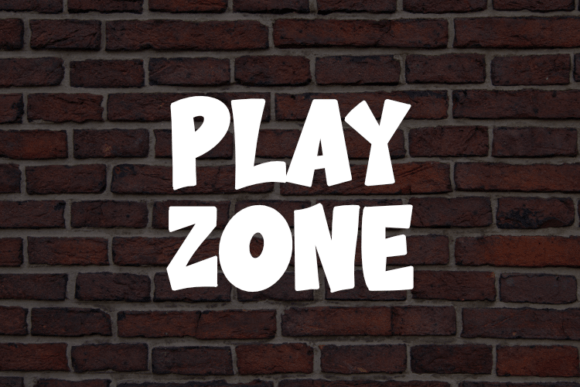
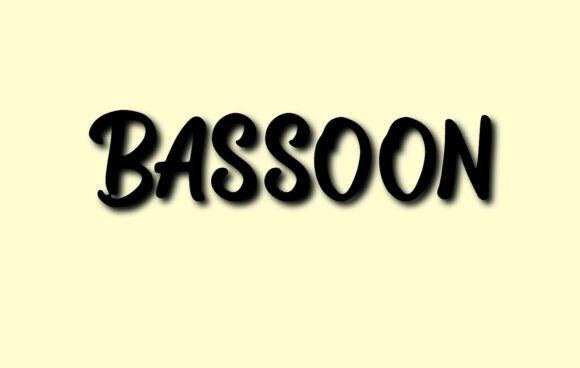
If you're in search of a font that commands attention without sacrificing readability, Bassoon might just be your ideal match. This brush-style display script is both energetic and elegant, blending thick, rounded strokes with a vintage flair that's hard to ignore. Whether you're designing a logo, crafting product packaging, or building a social media graphic, Bassoon brings a confident, lively presence that works across both print and digital formats.
Why Designers Love Bassoon
What sets Bassoon apart is its unique balance of boldness and clarity. Unlike many script fonts that lean too cursive or delicate, Bassoon uses an all-caps structure that maintains legibility even at a glance. Its rhythmic consistency and steady baseline make it feel structured, despite its playful, hand-brushed finish.
This makes it especially popular among creatives working in branding, food packaging, apparel design, and small business marketing. Whether you're launching a new coffee brand or designing a music festival poster, Bassoon injects personality without overwhelming your message.
Common Missteps When Choosing Bassoon
While Bassoon is versatile, it’s not a one-size-fits-all solution. Many designers and business owners fall into traps that reduce its effectiveness or even compromise their project’s professionalism. Here are some of the most frequent issues — and how to avoid them.
Mistake #1: Using Bassoon for Long Blocks of Text
Despite its readability, Bassoon is best suited for headlines, logos, and short phrases. Trying to use it for paragraphs or body text can strain the reader’s eyes and slow down message absorption.
Better approach: Use Bassoon for titles or accents, and pair it with a clean sans-serif or serif font for body copy. This contrast keeps your design dynamic without sacrificing readability.
Mistake #2: Overlooking Licensing Details
One of the most overlooked aspects when downloading or purchasing fonts is the licensing agreement. Some versions of Bassoon may be free for personal use but require a commercial license for business applications.
Better approach: Always check the license terms before using Bassoon in any client work, product packaging, or promotional materials. If you're unsure, contact the font provider or opt for a version with clear, commercial-friendly terms.
Mistake #3: Assuming All Bassoon Variants Are Equal
Because Bassoon is available from multiple sources, it's easy to assume they all offer the same quality and features. However, some versions may lack alternate characters, ligatures, or proper spacing, which can affect how your design looks across different platforms.
Better approach: Download from reputable font marketplaces like MyFonts, Fontspring, or Adobe Fonts to ensure you're getting a fully-featured, well-supported version of Bassoon.
Mistake #4: Ignoring Context and Brand Tone
Bassoon has a playful, retro personality — which means it may not be the best fit for formal or corporate environments. Using it in the wrong context can send mixed messages about your brand identity.
Better approach: Align your font choice with your brand voice. If you're running a luxury skincare line, Bassoon might feel out of place. But if you're launching a boutique bakery or indie music label, it could be just the right touch.
Practical Tips for Using Bassoon Effectively
Now that we've covered some common pitfalls, let's explore how to get the most out of Bassoon without compromising your design quality.
- Pair it wisely. Try combining Bassoon with minimalist fonts like Montserrat, Lato, or Merriweather. This contrast helps Bassoon stand out while keeping your overall layout balanced.
- Use it for visual hierarchy. Since it’s bold and attention-grabbing, Bassoon works well as a headline or call-to-action button. Avoid using it for subheadings or secondary text unless you're going for a stylized, cohesive look.
- Test in multiple formats. Before finalizing your design, check how Bassoon appears in print, on screens, and at different sizes. Sometimes brush-style fonts lose clarity when scaled down or printed on low-resolution materials.
- Adjust spacing when needed. Even high-quality fonts sometimes need manual tweaks for optimal spacing, especially in all-caps formats. Kerning adjustments can make a big difference in how professional your final product looks.
What to Check Before Downloading or Buying Bassoon
Before you commit to using Bassoon in your design project, take a few minutes to verify the following:
- Font format: Is it compatible with your design software? Most modern fonts come in OTF or TTF, but some may require WOFF for web use.
- Character set: Does it include special characters, numbers, and alternate glyphs? This matters if you're designing in multiple languages or need stylistic flexibility.
- Support and updates: Is the font actively maintained by the designer or vendor? Occasionally, updates fix bugs or improve rendering on different devices.
- Usage rights: Confirm whether it's licensed for personal, commercial, or web use. Some licenses also restrict how many users or devices can access the font.
Final Thoughts
Bassoon is a standout font that brings boldness and charm to a wide variety of design projects. Its brush-style finish and rhythmic structure make it both fun and functional — but only when used thoughtfully. By avoiding common mistakes like poor font pairing, incorrect licensing, or mismatched branding, you can ensure your designs look polished and professional.
Whether you're a small business owner creating a new logo or a designer crafting a product label, Bassoon offers a creative edge that’s hard to replicate. Just remember to respect its strengths and limitations, and you’ll be well on your way to making impactful, memorable visuals.